
By Alex Reed, Senior Gaming Contributor
Choosing between keyboard vs mouse controls can completely determine whether you dominate a leaderboard or struggle to beat basic levels in casual web games. You’ve probably felt it before. You load up a browser game, start playing, and something just feels off. Your character overshoots platforms, your clicks land a hair too late, or your fingers keep fumbling for the right key. You blame your skills, but the real culprit might be your controls.
Casual web games are wonderfully accessible. There’s nothing to install, no expensive hardware required, and most games work with whatever you’ve got on your desk. But that flexibility comes with a choice many players never think about: keyboard or mouse? Plenty of games support both, and picking the right one for the job can make a surprising difference to your scores.
This guide breaks down how each setup works, where each one shines, and how to get the most out of whichever you choose.
Core Mechanics: How Each Control Style Works
Keyboard Controls
Keyboard input is all about discrete actions. A key is either pressed or it isn’t. That makes it perfect for games built around clear, distinct moves:
- Arrow keys or WASD for movement.
- Spacebar for jumping or the main action.
- Shift, Z, X, or number keys for secondary actions, items, or abilities.
The big advantage is consistency. Pressing the right arrow always does exactly the same thing. There’s no aiming involved, so your inputs are precise and repeatable.
Mouse Controls
Mouse input is all about position and direction. Instead of choosing from a few set directions, you point exactly where you want to go or act:
- Moving the cursor to aim, steer, or select.
- Left-click for the main action.
- Right-click or scroll for secondary actions in some games.
- Click-and-drag for drawing, slicing, or launching.
The big advantage is precision and freedom. You can target any spot on the screen instantly, rather than moving there step by step.
Hybrid Controls
Many games combine the two: keyboard for movement, mouse for aiming. This is common in browser shooters, action games, and some platformers. It’s powerful, but it asks more of your hands.
Proven Strategies & Pro Tips
Match the Control to the Game Type
The single best tip is simple: pick the control that fits what the game asks you to do.
- Choose the keyboard for timing and rhythm. Platformers, endless runners, Snake, and rhythm games reward fast, repeatable inputs.For fast-paced directional play that demands tight spatial management, see our complete snake game strategy
- Choose the mouse for targeting and selection. Puzzle games, card games, Mahjong Solitaire, tower defense, and point-and-click adventures are built around picking spots on the screen.
- Use both for aim-and-move games. Shooters and arena games benefit from keyboard movement plus mouse aiming.
Set Up Your Space
Small physical tweaks make a real difference:
- Give your mouse room. Cramped space leads to lifted mice and lost aim.
- Use a mousepad. It makes cursor movement smoother and more predictable.
- Keep your keyboard at a comfortable height with relaxed wrists to avoid fatigue in longer sessions.
- Sit squarely in front of the screen so you’re not reaching or twisting.
Avoid These Common Mistakes
- Using a trackpad for fast games. Laptop trackpads are fine for slow puzzles but struggle with quick aiming. Even a cheap external mouse helps.
- Mashing keys. Rapid, panicked presses can register extra inputs, especially in games that queue up moves.
- Ignoring control settings. Many web games let you remap keys or adjust sensitivity. Check the options menu before you blame yourself.
- Switching mid-session. Changing control styles in the middle of a run disrupts the muscle memory you’ve built.
Comparing Keyboard vs Mouse Controls and Hybrid Setups
Here’s how each setup stacks up across common web game genres:
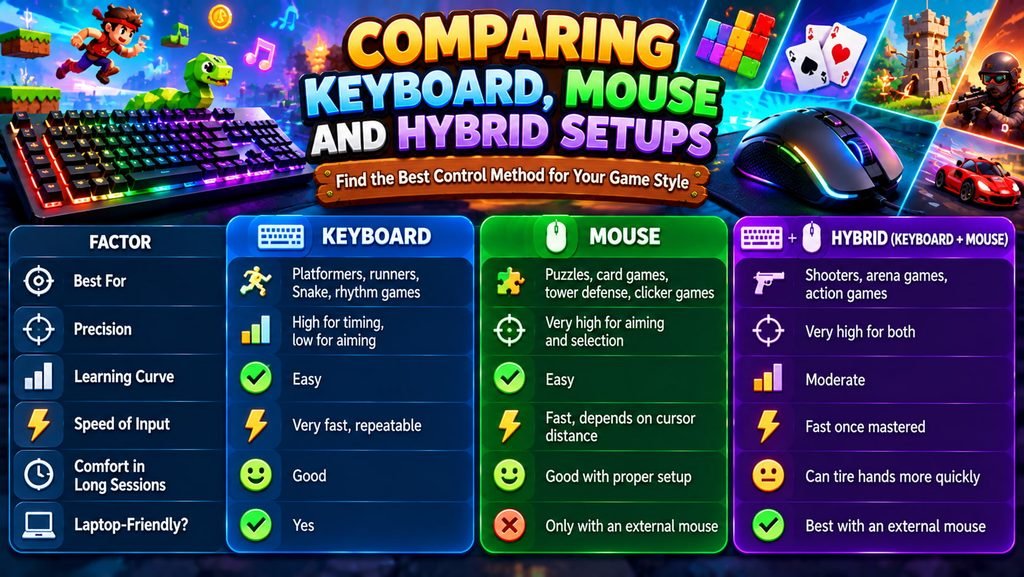
There’s no single winner. The “edge” comes from choosing the setup that fits the game in front of you.
Advanced Tactics & High-Score Secrets
Find Your Comfortable Key Layout
If a game lets you choose between arrow keys and WASD, try both. WASD keeps your left hand near other useful keys (like Shift, Q, E, and the spacebar), which matters in games with extra abilities. Arrow keys feel more natural for some players in simple directional games. Go with whatever feels fastest after a few practice rounds.
Tune Your Mouse Sensitivity
Many players never touch their mouse settings, but sensitivity can make or break your aim.
- Too high: The cursor flies past targets, and small movements cause big jumps.
- Too low: You have to drag the mouse across the desk to cross the screen.
- The sweet spot: You can comfortably reach every edge of the screen without lifting the mouse, while still making small, accurate adjustments.
Adjust it gradually in your system settings or in-game options, then give yourself a few sessions to adapt before changing it again.
Build Muscle Memory With Consistent Practice
Your hands learn through repetition. Playing the same game with the same controls builds automatic reactions, which is what lets top players move without thinking. Pick a setup and stick with it long enough to let those instincts form.
Use Your Fingers Efficiently
- Keyboard: Keep your fingers resting on their main keys rather than lifting and searching for them each time.
- Mouse: Use your wrist for small adjustments and your arm for larger movements. This combination gives you both speed and accuracy.
Watch for Lag
If your inputs feel delayed, the problem may not be your controls at all. Close extra browser tabs, turn off battery saver modes on laptops, and make sure your browser is up to date. A wired mouse or keyboard can also feel slightly more responsive than some wireless options.
Try Both Before Committing
If a game supports both styles, spend a couple of rounds with each. Some players discover that a game they assumed was “keyboard-only” actually feels better with mouse controls, or the other way around.
Final Verdict: Which Setup Should You Use?
The keyboard is the clear pick for players who love fast, timing-based games like runners, platformers, and Snake. The mouse wins for puzzle fans and strategists who play Solitaire, Mahjong, tower defense, or clicker games. And the hybrid setup is best for action and shooter fans willing to invest a little practice time for the highest ceiling.
If you mostly play on a laptop, the biggest single upgrade you can make is adding an external mouse. It opens up a whole range of games that feel clumsy on a trackpad.
Remember the core lessons: match the control to the game, set up your space, tune your sensitivity, and give your muscle memory time to build. Do that, and you’ll stop fighting your controls and start focusing on what matters most: winning.
Now go pick your setup and jump in. That high score isn’t going to beat itself.
Frequently Asked Questions
Which is better: keyboard vs mouse controls for browser games?
It depends entirely on the game genre. Keyboards offer superior rhythmic consistency for directional titles like runners and platformers, whereas a mouse provides unmatched precision for point-and-click puzzles, card games, and tower defense layouts.
Can you play fast web games using a laptop trackpad?
While laptop trackpads work well for static board games, they lack the speed, tactile button separation, and micro-precision required for fast reaction games. Adding an inexpensive external optical mouse immediately boosts performance.
What is the advantage of a hybrid keyboard and mouse setup?
A hybrid layout separates duties between your hands: the keyboard manages discrete directional movement (WASD), while the mouse provides continuous 360-degree aiming and targeting freedom.